

Algo AI is the AI assistant built into every HeatAlgo module: the heat loss calculation, heat pump sizing, heat recovery ventilation and radiant floor heating. It answers questions about the app and your project, reviews calculations, corrects values in forms, reads building documents and manages projects. It always works in a conversation, with a receipt for every change. One thing it never does: it does not calculate the heat loss. That is always the algorithm, to EN 12831-1. This article covers where Algo is, what it can do in each place, how its modes and limits work, and what happens to what you send it.
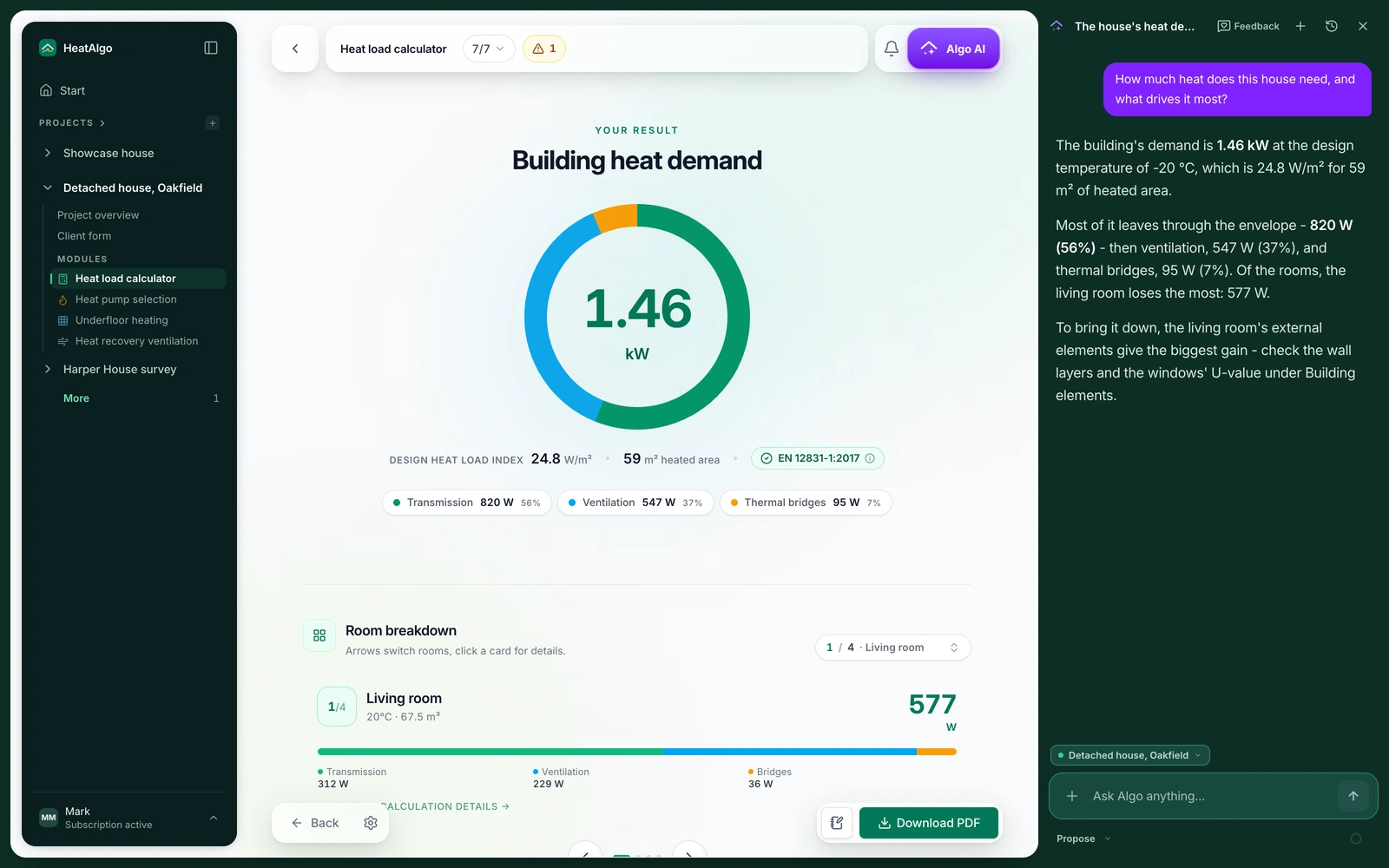
Where to find the Algo AI assistant
Algo is one assistant in three places. Only what sits beside it changes.
- Beside a project. The "Algo AI" button in the top bar opens Algo next to the module you are working in: as a column beside the form on a wide screen, or over the whole screen on a narrow one. Algo reads that module's document, can review it and can change values in it. When you open another project, the conversation moves to that project.
- On its own page. You get there from the "Algo AI" item in the side menu, from the "Algo" link next to a project in the menu, or with the full-screen button in the column. Your conversation history is on the left. Under the question field you pick the project the conversation is about ("Choose a project"). Without a project, Algo answers general questions only. On this page Algo reads every module of the chosen project, changes values in them when you ask, and creates, renames and deletes projects.
- From the field on the Start page. The field "Tell Algo what to do in your project..." opens Algo's page with your question already sent. Next to it are ready-made questions, such as "Find what is missing in a project" or "What can you do in heatalgo?".
In the radiant floor heating module ("Underfloor heating" in the app) you open Algo with the icon in the drawing toolbar. You can ask questions and request editable AI sections. Review the proposal before you replace existing work.
What Algo can do
- Answers questions about the app: where a field is, which step it is on, why something is not visible. It adds "Go to: ..." buttons that take you to the right screen and step.
- Answers questions about your project: what is in the heat loss calculation, what the heat loss of a room is, what to change to lower the result. It reads the module documents, so you do not retype anything.
- Reviews the project. The "Review this project" button (or a question like "what is wrong in this project?") starts a review. The result is a list of things to check at two levels: "Probably wrong" and "Worth a look". You go through each item in the "What was found" panel with "Put into the form" and "Skip" (or "Apply all" / "Skip all"). On a free account Algo reviews the inputs. It reviews the calculation results once the project is unlocked. If the form changed after the review, Algo says the result is out of date and asks you to run it again.
- Changes values. When you tell it to ("set n50 to 1.5", "change the bathroom temperature to 75 °F"), it writes values into the module. Every save gets a receipt in the conversation ("Saved N values") with the list of changes ("What changed") and an "Undo" button.
- Reads documents. You upload a set of building plans, a window schedule, an energy performance certificate or a photo of a nameplate, and Algo proposes values for the form. In the heat loss calculation it reads the whole set of plans and enters the rooms, building elements, windows and doors.
- Manages projects: creates a new project, renames one, deletes one (with restore) and puts your project list in the conversation, so you can open the right one from there.
- Answers questions about regulations and about help for the app, and cites its sources.
What Algo does not do: it does not calculate heat loss or hydraulics. HeatAlgo's algorithm does every calculation (heat loss to EN 12831-1, ISO 6946 and ISO 13370), and the report carries its figures. Algo also does not export reports, does not send anything to your client and does not work on several projects at once. A separate feature can propose radiant floor heating sections. There Algo draws only the section outlines and the loops. You place the manifold yourself, and you draw the supply runs and the ventilation ducts separately.
Feet, °F and Btu/h
If your account uses imperial units, Algo answers in them too: feet, ft², °F and Btu/h. You can type a value in those units, and Algo converts it to metric before it saves. Every calculation stays metric, to EN standards. You switch units in Settings - see settings, logo and notifications.
Modes: Propose and Automatic
In the conversation beside a module you pick how Algo works:
- "Propose" - Algo marks the proposed values on the form's fields, and you approve each one before it is saved.
- "Automatic" - Algo saves changes right away, without asking. Every save gets a receipt with an "Undo" button, which works for 30 days. If the document changed again in the meantime, undo may not be possible - Algo tells you so plainly.
Algo's own page runs in automatic mode only. If you had unsaved changes on the form and Algo saved its own, the form refreshes to Algo's version. So save your changes before you ask for corrections. Before Algo changes a value, we save a copy of the project's previous version.
Reading documents
You attach PDF files and JPG, PNG and WEBP photos to the conversation. Drag them onto Algo's window ("Drop the document here"), or use the "Add" menu and "Load a document". You can send up to 5 files and 20 MB in total at once. Algo skips other file types and tells you. You can also paste plain text, for example a row from the window schedule.
Documents attached in a conversation about a project start a reading in the background. It starts at once and uses the same monthly Algo limit as the conversation. In "Propose" mode Algo shows the data it read, and you save it with "Put into the form". In "Automatic" mode it saves on its own. "Undo" takes the save back. If the document has nothing that fits the form, Algo says so plainly instead of guessing.
In the heat loss calculation Algo reads the whole set of building plans: the floor plans, the sections, the written specifications and the window and door schedule, plus the energy performance certificate. You start with "Start with Algo" on the step 1 start screen and attach the documents in the conversation about the project. Algo enters the rooms with their names and areas from the plan, and the building elements from the sections, the specifications and the certificate. It places the windows and doors in the walls of the right rooms, from the marks on the plan and the schedule. Then it lists what is left to complete, and each item leads to its field. Fields with nothing in the documents stay empty, and Algo never overwrites your value with one the documents do not state.
A reading uses the same monthly Algo limit as the chat and does not use a report. The limit grows once you buy a report and is largest with a subscription. When it is used up, Algo tells you before it starts. One reading also fills heat pump sizing and heat recovery ventilation at no extra cost. One account can run up to 10 readings per 24 hours. Administrative pages (decisions, applications, pages about a person) are deleted as soon as they are recognized and never go on to the reading. The heat loss calculation guide walks through it step by step.
On the radiant floor and ventilation drawings Algo can offer to use an uploaded file as the floor's plan ("Use this file as the plan?"). If that floor already has a plan, it refuses and points you to the drawing settings.
The files and their page images are stored only for the reading and deleted automatically 24 hours after it starts. The reading's result is deleted after 30 days at the latest. Only what you approve stays: the values, the plans of the floors you confirmed, and a plan you set with a button as the drawing's backdrop in radiant floor heating or heat recovery ventilation. A model provider in the European Union processes the documents for us under a data processing agreement. The privacy policy, section 4, has the details.
Sources under an answer
When a question is about regulations (for example a subsidy program or the EU F-gas regulation), help for the app or what changed in HeatAlgo, Algo looks for the answer in our knowledge base: guides and help articles, announcements, the changelog, product pages and selected regulations. Under the answer a "Sources" section then appears with cards: "Guide", "Update", "Regulation", "Page" or "Changelog", with the publication date or the date of the legal text. A card opens the source in a new browser tab. The regulations in the knowledge base are Polish and EU ones.
Algo can be wrong. Under the question field you see the reminder "check the source". An answer without source cards comes from what Algo knows about the app or your project, not from the knowledge base.
Conversations and history
Conversations are kept. On Algo's page the "Conversations" list lets you go back to any of them, rename one ("Rename") or delete it. "New conversation" starts an empty one. The same conversation is available in the column beside a project and on the page. If you close the tab before Algo finishes answering, the conversation pauses with a "Continue" button.
The monthly limit
Every account has a monthly allowance for conversations with Algo and project reviews. You see usage in Algo's window as a percentage ("You have used X% of this month's Algo budget"). The counter resets on the first day of the month. Free accounts have the smallest allowance, accounts with a purchased report a larger one, and a subscription the largest. A project review draws on the same allowance as questions. One review uses more than one question, because Algo reads the whole module document. The larger allowance from a purchased report applies in the month you buy it. From the next month, an account without a subscription goes back to the free allowance. You cannot top up the allowance on its own - a report or a subscription raises it, and both are on the pricing page. We do not publish the figure. The allowance is counted in model usage, and you see its state as a percentage.
When the allowance is used up, the conversation stops with "This month's Algo budget has been used up" and cannot continue until the start of the next month. The "See plan" button leads to a purchase. The form and the calculations keep working - the limit applies to the assistant only.
Wrong answers and other problems
Under every answer there is a "Report a wrong answer" button. The report reaches us with the conversation and helps us improve the assistant. You take a report back with "Withdraw the report".
Messages you may see:
- "Algo is temporarily unavailable" or "The AI service is temporarily overloaded" - try again in a moment,
- "The answer took too long and was interrupted" - ask a shorter question or send fewer files,
- "The answer stopped before the end" - everything that arrived is in the conversation; ask about the rest,
- "Algo is currently switched off" - we turned the assistant off for a while on our side.
What Algo sees and what we keep
Algo sees the content of the modules of the project you are talking about, and what you write. It also reads "My library" - the constructions, windows, doors, units, fittings and radiators saved on your account. It adds, changes or deletes an entry only when you ask, and you can undo each such change with "Undo" beside the entry in the conversation. It has no access to other accounts or to billing. We do not send the model the data that identifies your client in the project. The Privacy Policy describes what goes to the AI model. In Settings you have the switch "Keep technical logs of the assistant". It decides whether we keep the content of requests and the model's reasoning summary so we can look into errors. Details are in the article on settings.
AI sections on your floor plan
In the radiant floor heating module Algo does one more thing. From an uploaded plan it proposes sections with their tubing layout, and you review them on the drawing and apply them with one button. One generation per account is free. The first read of a plan uses it up, not Apply. The manifold, the supply runs and the design inputs stay yours. The details are in radiant floor heating sections from a floor plan.
Algo names the draft's rooms from the text on the plan, and names unlabeled spaces in the app's language. You can also upload the plan as a HEIC photo from an iPhone. That works for the radiant floor plan only, because in the conversation Algo reads PDF, JPG, PNG and WEBP. While a draft is open, the drawing is locked until "Apply" or "Discard". Panning and zooming still work.
A HeatAlgo report follows EN 12831-1 and EN 1264, not ACCA Manual J, and is not accepted for permits or rebates.