

You have a heat pump quote with an output figure on it, and no way to check it? Second opinion in HeatAlgo puts it beside your own house's heat loss and splits the difference into parts: the assumptions the quote states, the margin it states, and the rest that is worth asking about. It gives no verdict on the quote or on the contractor.
This guide walks through the whole tool, screen by screen. Buttons and names are given exactly as the app shows them. A US account sees every figure in °F and Btu/h; the calculation behind them stays metric, to EN 12831-1. What Second opinion is and what it does not do is also on its own page.
What Second opinion compares
You can add up to three quotes to one project. Each is checked against the same list of seven things: the design outdoor temperature, the room heat losses, the standard used, the heat pump's output at the design temperature, its minimum output, the supply water temperature, and whether the output includes domestic hot water.
When a quote states an assumption that can be calculated - a different outdoor design temperature, for example - the heat loss engine recalculates your house with that assumption. It is the same engine that calculated your house, so every reason is a calculation, not an estimate. A margin the quote states is added as the quote states it. Whatever the quote's own figures cannot explain is shown as a part of its own and turned into a question.
The example from our page, with a made-up quote: the quote says 18,426 Btu/h (5.4 kW), your house 11,226 Btu/h (3.29 kW) at -0.4 °F (-18 °C). Of the difference, 1,808 Btu/h (0.53 kW) comes from the -11 °F (-24 °C) the quote assumed, 2,593 Btu/h (0.76 kW) is the 20% margin the quote states, and 2,798 Btu/h (0.82 kW) is not explained by anything the quote states - that is the part worth asking about.
1. Calculate your house's heat loss
The "Your house" column is your own room-by-room heat loss, from the heat loss calculation. We never put an estimate from square footage there. Without it, Second opinion shows only what the quote states and what it leaves out.
How to go through the heat loss calculation step by step is in heat loss calculation: how to use the module. [[Algo AI]] can read your house plans, and you check every value.
2. Open Second opinion in the project
In the project overview, below the modules, there is a "Tools" section. Choose "Second opinion" there. The same section is in the project's side menu.
The first screen shows three steps and one line under the buttons. It says where the "Your house" column comes from: your project's heat loss calculation, with its heat loss and design temperature. When there is no calculation yet, the line reads "Without a heat loss calculation we compare only what the quote states." and takes you to it.
3. Add the quote
There are two ways in:
- "Upload a quote with Algo" - you pick a PDF or a photo of the quote and [[Algo AI]] reads it. Before anyone reads the figures, an AI model marks the contractor's details on the page - company name, address, phone, email, tax and bank numbers, logo, signature - and we paint them over. A second model reads only the painted image of the page and only the figures about the house and the proposed system.
- "Type the figures yourself" - opens an empty quote form. This is the way in with no AI. Type only what the quote states; leave a field empty when the quote does not give it.
Algo reads the figures, but only what you confirm is compared.
4. Check the figures on the Quotes step
The "Quotes" step looks like the rooms list in the heat loss calculation: the quotes on the left, the picked quote's figures on the right, in sections - building, outputs in the quote, heat pump, heating water, building elements, rooms and radiant floor heating. A figure Algo read is marked "read", one you changed "corrected", one you typed "typed".
A new quote is marked "to check". Compare the figures with the quote, correct what needs correcting and click "Confirm the figures". The quote is then marked "checked", and every later change saves itself. The name you give the quote is seen only by you - it is not printed in the report.
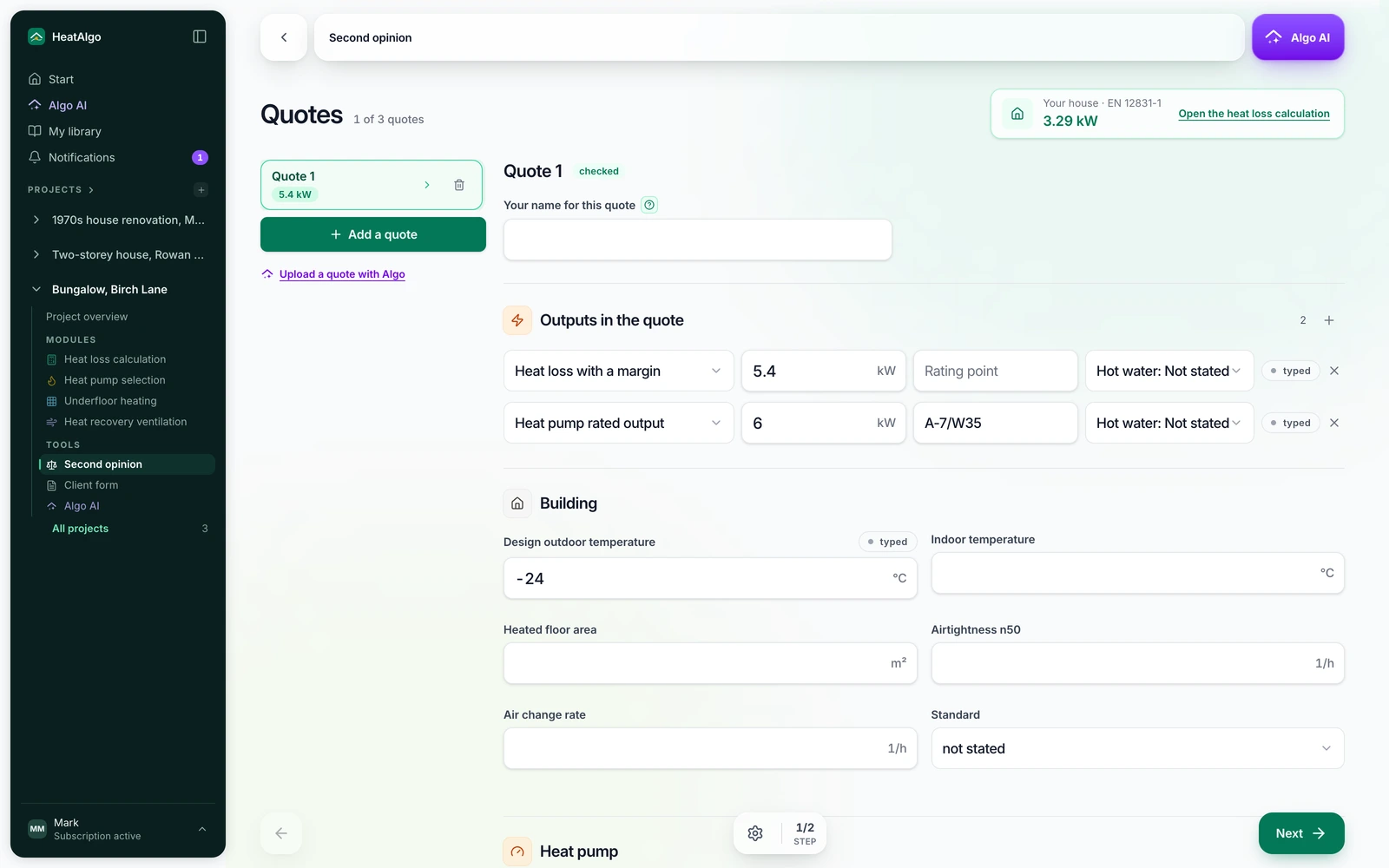
Add another quote with "Add a quote", up to three per project.
5. Read the Result
The "Result" step opens on two figures: the quote's heat loss and your house's, with one sentence about the difference. Below them:
- "Where the difference comes from" - a bar split into parts: "Assumptions the quote states", "Margin stated in the quote" with its percentage, and "Not explained by anything the quote states". Assumptions affect each other, so the single differences do not add up exactly - the app says so.
- "What the quote states" - a table of the seven things on the list, with your house beside them where the standard gives a value for the house. The heat pump's minimum output is shown as the quote states it: the standard does not calculate it, so we add no house figure to it. When the quote does not give it, the question asks for it at A7/W35.
- "Ask the installer" - questions from a fixed list, only about what the quote does not state or what differs from your house. "Copy the questions" copies them all, ready to paste into a message to your contractor.
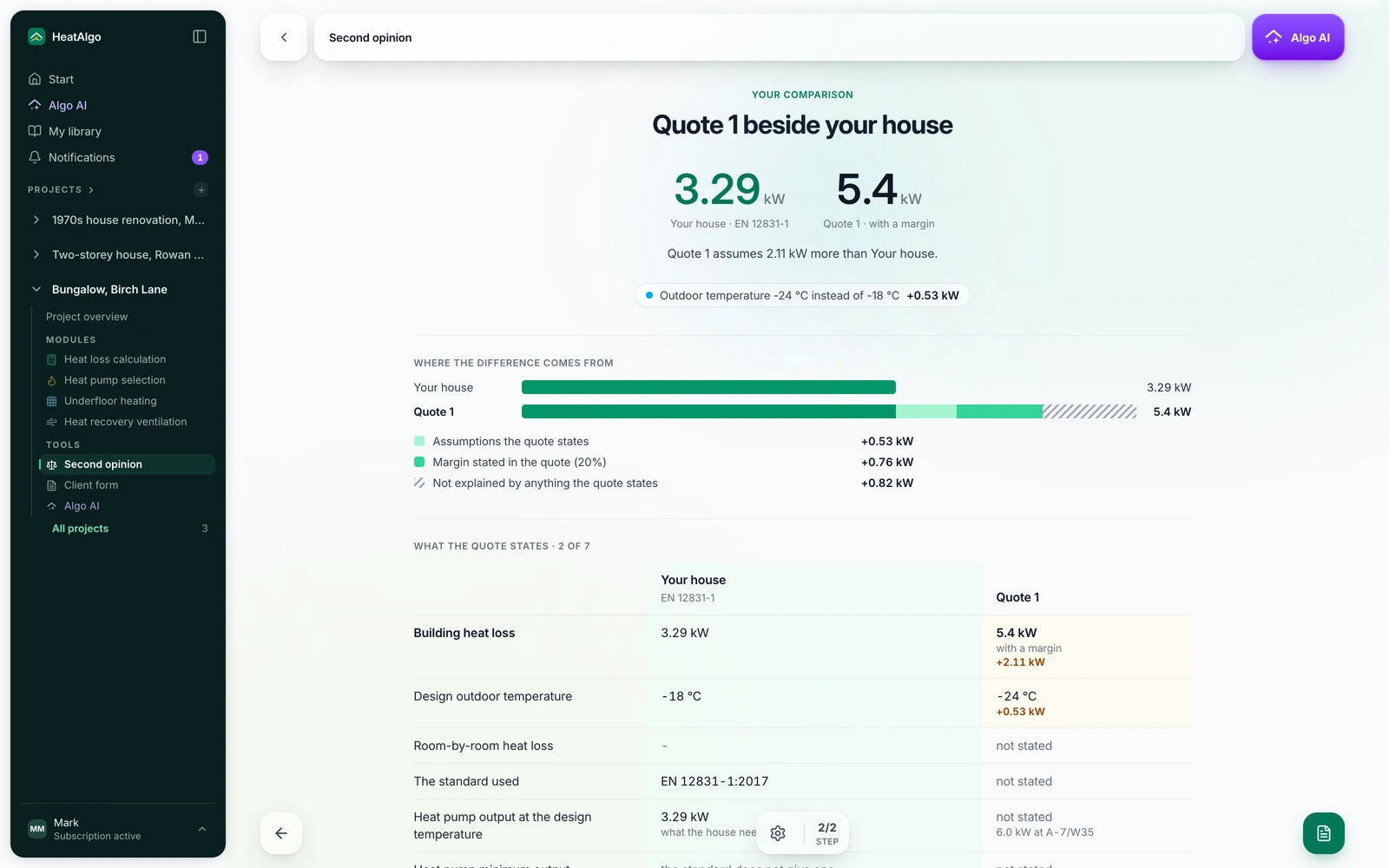
With two or three quotes, the Result sets them side by side, row by row, beside your house.
6. Download the heat loss report with its questions page
An unlocked heat loss report - in its "Full" and "Simple" versions - gains a "Questions about the quote" page, with each quote as "Quote 1", "Quote 2" and its questions. The contractor is not named on it, and your name for the quote is not printed. You can send the page to the contractor or take it to the conversation. The "Heat loss report with the questions on the quote" button on the Result opens the heat loss result, where you download the report.
What is free, and what comes with a report
Free: the list of what the quote states, the quote's heat loss beside yours, and the number of differences and questions. The reasons for the difference, the heat pump output, the temperatures, the rooms and the questions themselves are unlocked by a report that includes the heat loss calculation - the heat loss module alone ($19), the whole project or a subscription. Second opinion has no price of its own.
What happens to the quote
We keep only the figures you confirm, the heat pump model name and your own name for the quote. We never keep the file, a quotation from it or the contractor's details. The quote's files and page images are deleted at the latest 24 hours after the reading starts, and sooner once you confirm the figures. The details are in section 4 of the privacy policy.
Why a heat pump with a large margin is not the safer choice is explained in oversized heat pump: why it short cycles. A question this guide does not answer? Write to us.
Check your quoteA HeatAlgo report follows EN 12831-1 and EN 1264, not ACCA Manual J, and is not accepted for permits or rebates.