

Skip to content
HeatAlgo
BlogGuides

A second opinion on a heat pump quote: how to compare it with your own house

Step by step: calculate your house's heat loss to EN 12831-1, add the installer's quote and see where the kW difference comes from and what to ask. No verdict.

Founder of HeatAlgo, author of the calculation engine to EN 12831 and EN 1264

You have a heat pump quote with a kW figure on it, and no way to check it? Second opinion in HeatAlgo puts it beside your own house's heat loss, calculated to EN 12831-1, and splits the difference into parts: the assumptions the quote states, the margin it states, and the rest that is worth asking about. It gives no verdict on the quote or on the installer.

This guide walks through the whole tool, screen by screen. Buttons and names are given exactly as the app shows them. What Second opinion is and what it does not do is also on its own page.

What Second opinion compares

You can add up to three quotes to one project. Each is checked against the same list of seven things: the design outdoor temperature, the room heat losses, the standard used, the pump's output at the design temperature, the pump's minimum output, the flow temperature, and whether the output includes hot water.

When a quote states an assumption that can be calculated - a different outdoor temperature, for example - the heat loss engine recalculates your house with that assumption. It is the same engine that calculated your house, so every reason in kW is a calculation, not an estimate. A margin the quote states is added as the quote states it. Whatever the quote's own figures cannot explain is shown as a part of its own and turned into a question.

The example from our page, with a made-up quote: the quote says 5.4 kW, your house 3.29 kW at -18 °C. Of the difference, 0.53 kW comes from the -24 °C the quote assumed, 0.76 kW is the 20% margin the quote states, and 0.82 kW is not explained by anything the quote states - that is the part worth asking about.

1. Calculate your house in the heat loss calculation

The "Your house" column is your own room-by-room heat loss to EN 12831-1, from the heat loss calculation. We never put an estimate from floor area there. Without it, Second opinion shows only what the quote states and what it leaves out.

How to go through the heat loss calculation step by step is in heat loss calculation: how to use the module. [[Algo AI]] can read your house plans, and you check every value.

2. Open Second opinion in the project

In the project overview, below the modules, there is a "Tools" section. Choose "Second opinion" there. The same section is in the project's side menu.

The first screen shows three steps and one line under the buttons. It says where the "Your house" column comes from: your project's heat loss calculation, with its heat loss and design temperature. When there is no calculation yet, the line reads "Without a heat loss calculation we compare only what the quote states." and takes you to it.

3. Add the quote

There are two ways in:

  • "Upload a quote with Algo" - you pick a PDF or a photo of the quote and [[Algo AI]] reads it. Before anyone reads the figures, an AI model marks the installer's details on the page - company name, address, phone, e-mail, tax and bank numbers, logo, signature - and we paint them over. A second model reads only the painted image of the page and only the figures about the house and the proposed system.
  • "Type the figures yourself" - opens an empty quote form. This is the way in with no AI. Type only what the quote states; leave a field empty when the quote does not give it.

Algo reads the figures, but only what you confirm is compared.

4. Check the figures on the Quotes step

The "Quotes" step looks like the rooms list in the heat loss calculation: the quotes on the left, the picked quote's figures on the right, in sections - building, outputs in the quote, heat pump, heating water, building elements, rooms and underfloor heating. A figure Algo read is marked "read", one you changed "corrected", one you typed "typed".

A new quote is marked "to check". Compare the figures with the quote, correct what needs correcting and click "Confirm the figures". The quote is then marked "checked", and every later change saves itself. The name you give the quote is seen only by you - it is not printed in the report.
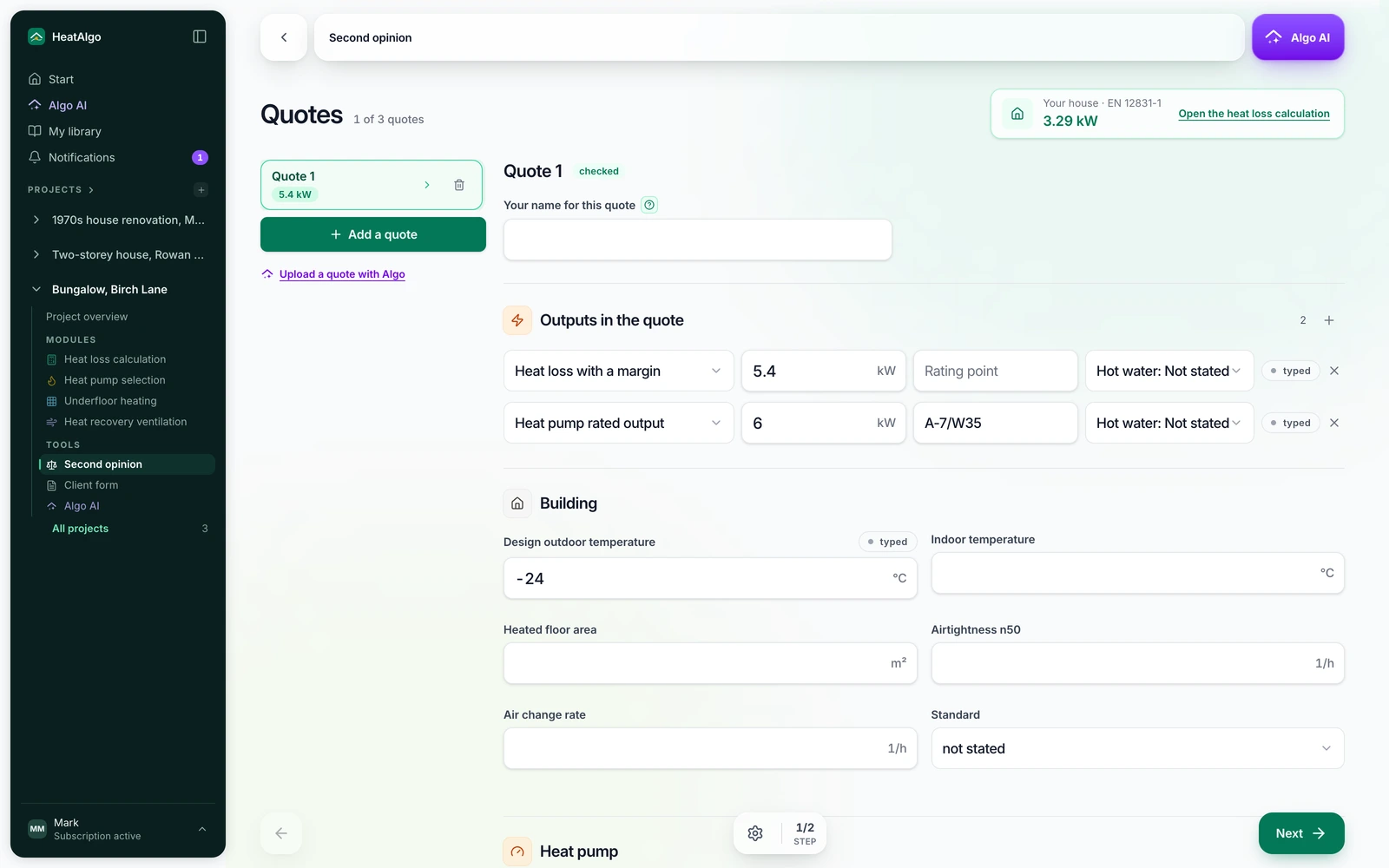
The Quotes step of Second opinion: the list of quotes on the left, and the picked quote's figures to check on the right

Add another quote with "Add a quote", up to three per project.

5. Read the Result

The "Result" step opens on two figures: the quote's heat loss and your house's, with one sentence about the difference. Below them:

  • "Where the difference comes from" - a bar split into parts: "Assumptions the quote states", "Margin stated in the quote" with its percentage, and "Not explained by anything the quote states". Assumptions affect each other, so the single differences do not add up exactly - the app says so.
  • "What the quote states" - a table of the seven things on the list, with your house beside them where the standard gives a value for the house. The pump's minimum output is printed as the quote states it: the standard does not calculate it, so we add no house figure to it. When the quote does not give it, the question asks for it at A7/W35.
  • "Ask the installer" - questions from a fixed list, only about what the quote does not state or what differs from your house. "Copy the questions" copies them all, ready to paste into a message.
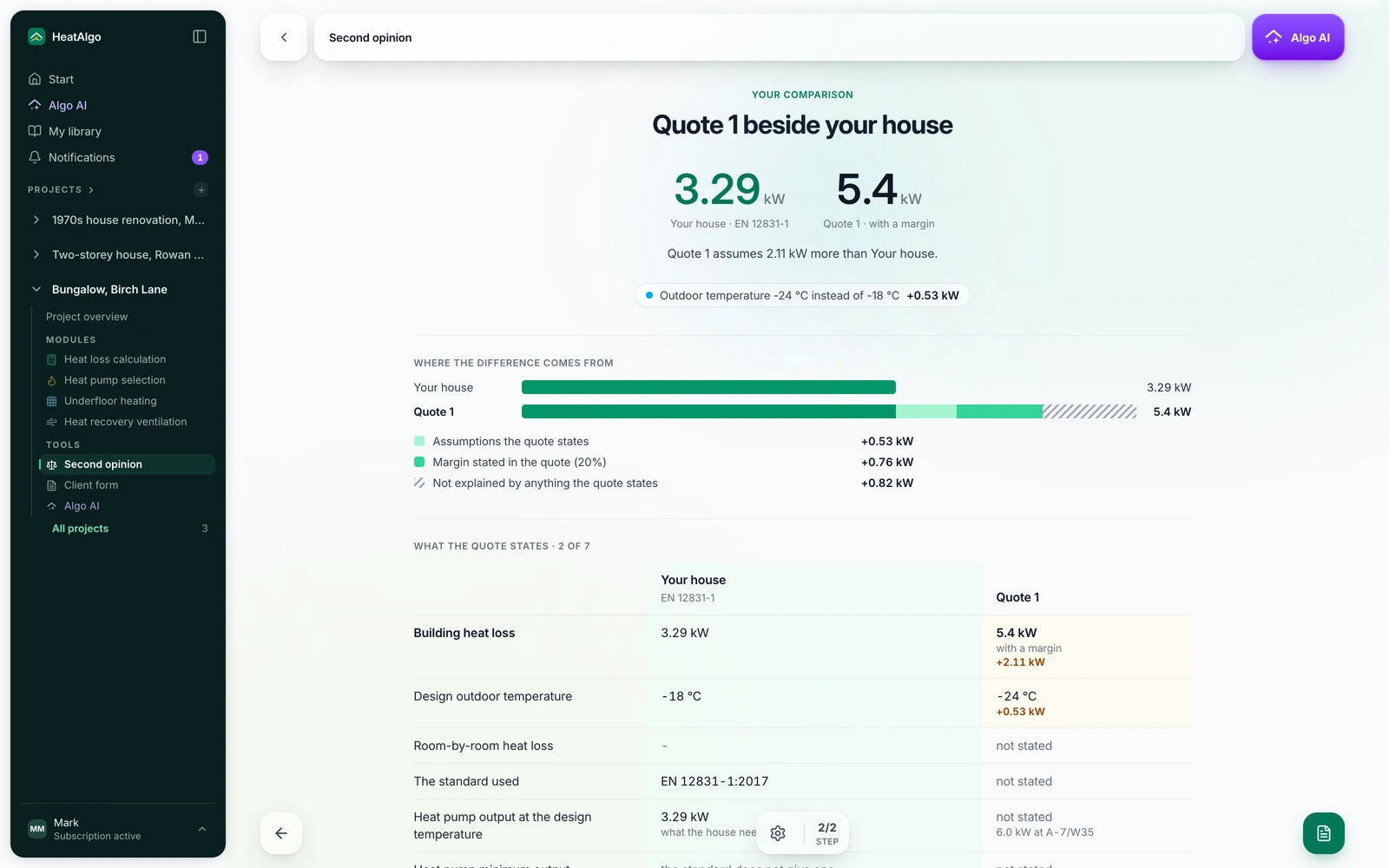
The Result step of Second opinion: a quote of 5.4 kW beside a house of 3.29 kW, the difference split into assumptions, margin and the rest, and the table of what the quote states

With two or three quotes, the Result sets them side by side, row by row, beside your house.

6. Download the heat loss report with its questions page

An unlocked heat loss report - in its "Full" and "Simple" versions - gains a "Questions about the quote" page, with each quote as "Quote 1", "Quote 2" and its questions. The installer is not named on it, and your name for the quote is not printed. You can send the page to the installer or take it to the conversation. The "Heat loss report with the questions on the quote" button on the Result opens the heat loss result, where you download the report.

What is free, and what comes with a report

Free: the list of what the quote states, the quote's heat loss beside yours, and the number of differences and questions. The reasons for the difference in kW, the pump output, the temperatures, the rooms and the questions themselves are unlocked by a report that includes the heat loss calculation - the heat loss module alone (€19), the whole project or a subscription. Second opinion has no price of its own.

What happens to the quote

We keep only the figures you confirm, the pump model name and your own name for the quote. We never keep the file, a quotation from it or the installer's details. The quote's files and page images are deleted at the latest 24 hours after the reading starts, and sooner once you confirm the figures. The details are in section 4 of the privacy policy.

Why a heat pump with a large margin is not the safer choice is explained in oversized heat pump. A question this guide does not answer? Write to us.

Check your quote

HeatAlgo newsletter

New guides, HeatAlgo product changes and offers - straight to your inbox. You confirm the sign-up with a link we send you.

FAQ

Frequently asked questions

Will HeatAlgo tell me whether the quote is good?

No. Second opinion shows the quote's figures beside your house, what the kW difference is made of and what is worth asking. It gives no verdict on the quote or on the installer - the decision and the conversation with the installer are yours.

What if I have not calculated my house yet?

You can still add the quote, but you will only see what it states and what it leaves out. The "Your house" column is only ever your own heat loss calculation to EN 12831-1 - never an estimate from floor area.

What happens to the quote file and the installer's details?

First an AI model marks the blocks with people's and companies' details on the page, and we paint them over before a second model reads the figures. We keep only the figures you confirm, the pump model name and your own name for the quote - never the file or the installer's details. The files are deleted at the latest 24 hours after the reading starts, and sooner once you confirm the figures. Details are in section 4 of the privacy policy.

What is free, and what comes with a report?

Free: the list of what the quote states, the quote's heat loss beside yours, and the number of differences and questions. The reasons for the difference in kW, the pump output, the temperatures, the rooms and the questions themselves are unlocked by a report that includes the heat loss calculation - Second opinion costs nothing extra.

Blog

See also

Guides

Underfloor heating not working in one room? Check heat loss and loop flow first - 5 causes in order

Underfloor heating not working in one room? Check in order: the room's heat loss against the floor's output, loop flow, flow temperature and floor covering.

Releases

Update: underfloor heating drawn for you, the app in five languages and new PDF reports

Algo AI reads the floor plan and the app draws the underfloor heating. The app now speaks German, French and Dutch, and PDF reports have a new print design.

Releases

Update: a bill of materials, one-module reports and Algo AI in every field

Underfloor heating now works out what to order from the merchant, a report can cover one or two modules, and one Algo AI reading fills three modules.

Releases

Update: Algo AI reads the building design, party walls and My library

Algo AI fills the heat loss calculation from the building design, party walls count against the neighbour, and underfloor heating gets a new panel.

Guides

Retrofit underfloor heating on a concrete floor: milling channels or an overlay?

Floor milling cuts channels for water underfloor heating into your existing screed. When the floor suits it, what a quote should list, and the alternatives.

Guides

Retrofitting water-based underfloor heating: what to measure first

A new screed, a dry system or milling? Measure levels at doors, thresholds and stairs, find out the floor layers and check room heat loss. With a worksheet.

Guides

Where to put an underfloor heating manifold: cupboard, under the stairs or central?

Choosing an underfloor heating manifold location: one floor, two positions, the pipe runs and loop lengths HeatAlgo calculated, and what to ask your installer.

Guides

How to check an underfloor heating design: the drawing, the loop schedule and room heat loss

Check the drawings, room calculations, loop details and handover scope in a water-based underfloor heating design. Includes a quote-comparison worksheet.

Guides

Getting an underfloor heating quote: what to prepare and how to compare quotes

Prepare for a water-based underfloor heating quote: floor plans, insulation, floor finishes, heating system and questions for your installer.

News

Underfloor heating from a floor plan: AI draws the sections and loops

Upload a floor plan (PDF, PNG, JPG, HEIC, DWG or DXF): HeatAlgo draws underfloor heating sections, supply runs and the manifold, output and flows to EN 1264.

Releases

Update: simpler plan selection and checkout

Compare plans in one window, unlock a complete project and enter your discount code at checkout.

Guides

Heat recovery ventilation in HeatAlgo (beta): six steps from rooms to the balance and the unit

The six steps of the ventilation module: building, rooms and airflows to PN-83/B-03430, ducts on floor plans, the unit from EPREL, modes and the balance.

Guides

Algo, the AI assistant in HeatAlgo: what it does, where to find it and its limits

Where to open Algo AI, how it reads building documents and reviews a project, the Propose and Automatic modes, undo, files, sources and the monthly limit.

Releases

Update: underfloor heating now computes to EN 1264

Loop output answers to spacing, layout and the drawn pipe; the characteristic from EN 1264-2, each loop's spread and flow from EN 1264-3 - what's new in HeatAlgo.

Guides

Underfloor heating flow temperature with a heat pump: what each floor finish gives at 35-45 °C

Water temperature and floor covering set a floor's output, not its area. Calculated table: what 30, 35, 40 and 45 °C give per m² under tile, wood and carpet.

Guides

Electric underfloor heating loses its subsidy in 2027 - what stays in Czyste Powietrze

From 2027 the programme funds no heating mats, electric boilers, electric radiators or electric underfloor heating. What stays on the list, and what it changes.

Guides

Underfloor heating pipe spacing: 100, 150 or 200 mm, and how long a loop can be

The (area ÷ spacing) × 1.1 formula counts neither the run to the manifold nor the setback from the walls. Here is how far off it is, and how to work out a loop from real geometry.

Guides

Split heat pump ban 2027: what leaves the market, and what stays

No, an installed heat pump does not have to be replaced. From 1 January 2027 split air-to-water units up to 12 kW on GWP 150 or more leave the market.

Releases

Update: data travels between modules, and the app has a new layout

Heat loss calculations and the client form now feed every module, the app has a new layout, and supply runs can cross heated rooms - what's new in HeatAlgo.

Guides

Oversized heat pump: short cycling, and how to check your installer's kW figure

Why a heat pump sized "with a margin" cycles, loses seasonal efficiency and wears its compressor faster - and how to size one from a calculation, not a rule of thumb.

Guides

Installer's glossary: heat loss, U-value, lambda, thermal bridges

Heat loss and equipment sizing terms explained: U-value, lambda, thermal resistance, thermal bridges, n50, bivalent point, SCOP and the heating curve.

Guides

A client's glossary: what the terms in your installer's form mean

Your installer is asking for floor plans, sections and a window schedule? Here is what each of those documents is, why it is needed and where to find it.

Guides

Heat loss calculation, room by room: what it is and why W/m² rules of thumb fail

The design heat loss is the power a house needs in the coldest hour of the year, to EN 12831-1. Worked example: 102.2 m², 4382.07 W. What depends on it, what it costs.

Releases

Update: pump sizing straight from the heat loss calculation

The pump module now reads the project's heat loss calculation directly - no imported copies, a per-room loss breakdown, and the full reasoning behind the selected capacity.

Releases

Update: a new generation of underfloor heating drawings

Spiral and meanders drawn like a working design, consistent rules for any room shape, and editable loop nodes - what's new in HeatAlgo.

Releases

Update: AI fills in project data from building documents

AI reads the building design, window schedule and energy certificate, and you approve the data into the heat loss form - what's new in HeatAlgo.

Guides

How to use the underfloor heating module - a step-by-step guide

Upload a floor plan, draw sections yourself or let Algo AI draw the loops, supply routes and manifold, check the results, and download the report and floor plan as PDFs.

Releases

Update: better underfloor heating design and in-app help

A smoother underfloor heating design workflow, in-app help, a help center and multiple storeys in one project - what's new in HeatAlgo.

Guides

How to send a client the form and get complete data - a guide

From creating the project to accepting the client's data - a simple step-by-step guide, screen by screen, no jargon.

Put room-by-room results behind your heating decision.

Prepare a report for €29 incl. VAT. One payment unlocks every module for your house.

Create an account, add your building data, then buy the report in the app. Editing is never limited. New PDF versions for 7 days from each module's first download.